Invoice, get paid and balance the books in the same place
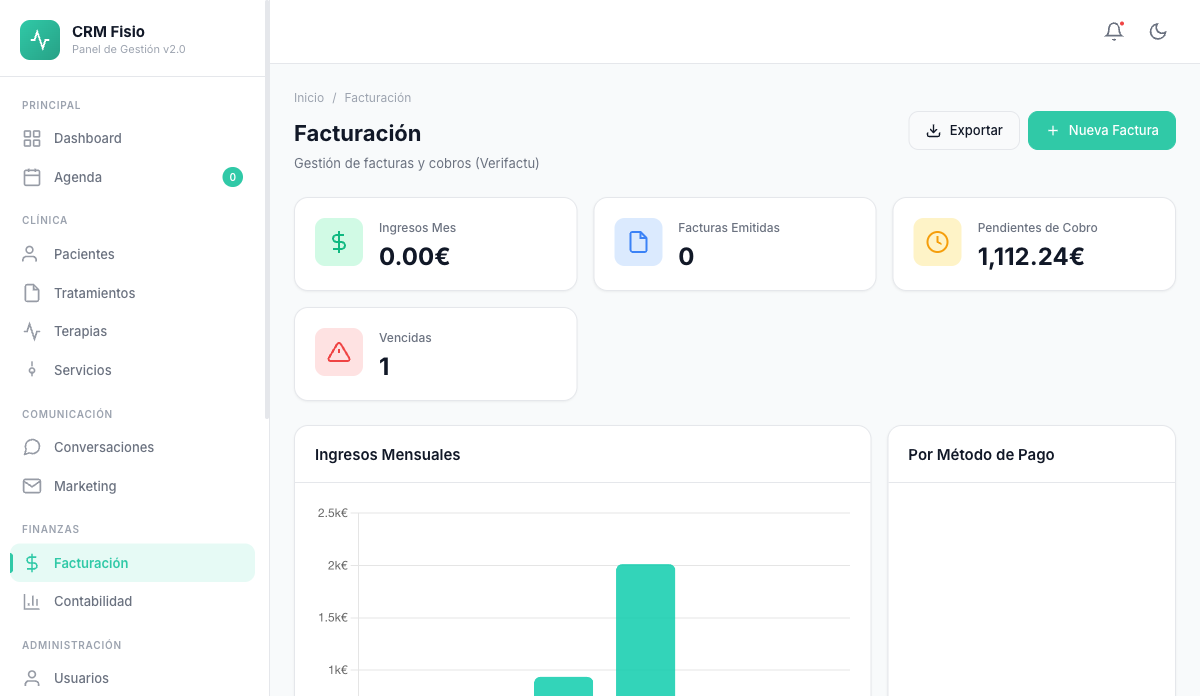
Invoices with legal numbering and built-in electrónica invoicing, each one's payment status, and the clinic's accounting with no separate program.
- Built-in electrónica invoicing
- Line-item credit notes, without voiding the invoice
- Income, expenses, banks and taxes in one panel
What gets complicated when invoicing today
Manual numbering
Gaps or duplicates in the series that later need explaining, and every deleted draft leaves a hole.
Two programs that don't talk to each other
The schedule in one, invoices in another, and your accountant asking for a spreadsheet at the end of every quarter.
Payments that fall out of sight
No one knows which invoices are still outstanding or overdue until someone reviews them one by one.
Legal invoicing and clear accounts
What your clinic invoices flows straight into accounting, with no copying data between places.
Sequential numbering with no gaps
The number is assigned when you issue, not on the draft. Configurable series and format; receipts and pro forma invoices have their own series.
Submission to electrónica
The invoice is submitted when issued or with a single click. Each one shows whether it was accepted, rejected or errored, and the PDF carries its QR code.
Credit notes and voids
Credit only the lines or units you're refunding, with a reason. The original invoice stays valid. And if needed, void it.
Invoices from the treatment
Generate the invoice with the patient's treatment sessions, or issue it to a company using its tax details.
Payment statuses
Draft, issued, paid, overdue or voided. When you mark it paid, you record the method: cash, card, bank transfer or Bizum.
Accounting built in
Every invoice issued creates its income entry. Log expenses and supplier invoices, import bank statements and reconcile them.
How it works day to day
-
Create the invoice
From the treatment or from scratch, for the patient or for a company. It stays as a draft until you issue it.
-
Issue it
The sequential number is assigned and it's submitted to electrónica. You download the PDF with its QR code.
-
Get paid and reconcile
Mark it as paid with its payment method and the income entry updates itself in the accounting.
Your accountant gets the numbers already squared
Income, expenses, supplier invoices and banks all live alongside your invoices. Import the statement as a CSV, Fisionexa reconciles the transactions by amount and date, and you calculate the quarter's taxes without redoing anything.
- Automatic bank reconciliation by amount and date
- Spanish tax forms 303, 111, 130 and 347 calculated from your data
- Balance sheet, profit and loss, general ledger and journal
- Export invoices to CSV
What people usually ask
Is Fisionexa ready for electrónica?
Yes, it's fully integrated. Numbering is sequential, every invoice keeps the status of its submission, and the PDF carries the QR code. You can send it on issue or do it yourself with a button.
What do I do if I make a mistake on an issued invoice?
It doesn't get deleted. You issue a credit note for the affected lines, with a reason, or void the invoice. Everything is logged alongside the original.
Can I keep working with my accountant?
Yes. You have income, expenses, supplier invoices, taxes and accounting reports all in one place, and you can export invoices to CSV to hand over to them.
Can I invoice a company instead of the patient?
Yes. You register the company with its legal name, tax ID and address, and when creating the invoice you choose to issue it in its name.
Keep exploring the system
Every module shares data with the rest: what happens in one reaches the others without copying anything.
See it working with your clinic
Request a free 20-minute demo or jump straight into the interactive demo: the website and dashboard of a sample clinic.