Win back the patients who stopped coming
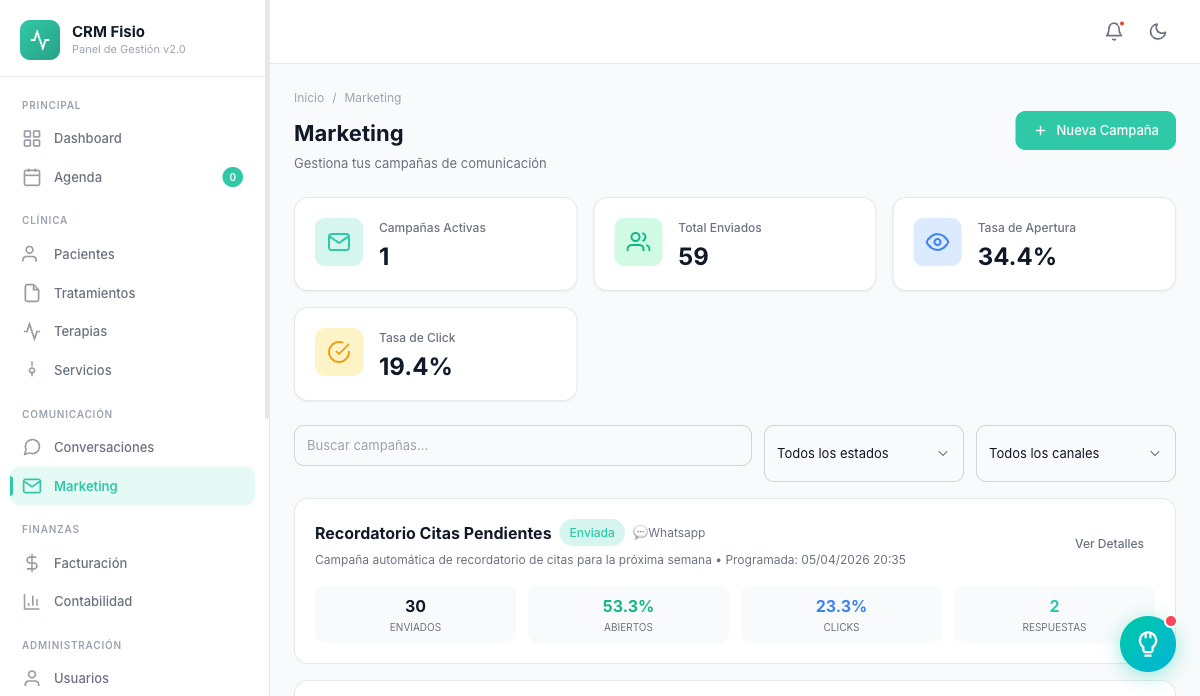
Email, WhatsApp and SMS campaigns with segments pulled from your schedule and your treatments. Choose who, write the message, and send it now or schedule it.
- Email, WhatsApp and SMS from a single panel
- Segments by inactivity, service or treatment
- Respects consent and opt-outs
What gets complicated with marketing today
Patients who never come back
They finish treatment and disappear. No one has time to check who hasn't set foot in the clinic for months.
Lists in spreadsheets
Exporting patients, filtering by hand and pasting phone numbers into another tool every time you want to send an update.
Messages to people who never asked for them
Sending promotions without knowing who gave their consent is a risk under LFPDPPP de México and a quick way to lose patients.
Everything you need to launch a campaign
No exporting lists or hiring another tool: the data is already in your clinic.
Email, WhatsApp and SMS
Choose the channel for each campaign. WhatsApp uses templates approved by Meta; SMS supports up to 160 characters.
Segments with clinical data
Inactive for X months, no sessions in X days, new patients, with an active treatment, by treatment type or service.
Audience preview before sending
See how many patients will receive the campaign and a sample of them as you adjust the segment, age or gender.
Send now or schedule it
Set the campaign's date and time and it goes out on its own. As long as it hasn't been sent, you can still edit or cancel it.
Templates with variables
Personalize with the patient's first and last name. WhatsApp templates are sent for Meta review directly from Fisionexa.
Results for every send
Sent, failed and each patient's status with the error reason. On WhatsApp, also whether it arrived and whether it was read.
How it works day to day
-
Choose who
Filter by inactivity, service or treatment type and see instantly how many patients match.
-
Write the message
Draft the email or SMS, or choose an approved WhatsApp template, with each patient's name.
-
Send or schedule it
Launch it now or leave it scheduled. Afterwards, check who received it and which sends failed.
You only write to people who said yes
Fisionexa keeps track of whether each patient accepts marketing communications, when and how they said so. WhatsApp and SMS campaigns skip anyone who hasn't accepted, and email campaigns skip anyone who has unsubscribed.
- Consent from the record, the web chat or a WhatsApp button
- Date and source of each consent recorded
- Unsubscribe link in appointment emails, respected in campaigns
- Reason logged when a patient is left out of a send
What people usually ask
Do I need a separate email marketing tool?
No. Campaigns go out from Fisionexa using the email you've configured for the clinic, the same one used for appointment notices. Your patients and segments are already inside.
How do WhatsApp campaigns work?
Through the official WhatsApp Business API. Meta requires approved templates for promotional messages: you create them in Fisionexa, submit them for review and see their status before using them.
Can I send to patients who haven't given consent?
Not via WhatsApp and SMS: the campaign skips them and logs the reason. Via email, anyone who has unsubscribed from communications is excluded.
What happens if a send fails?
It's flagged in the campaign with its reason, for example an invalid phone number, an incorrect email or missing consent. That way you know which records to fix.
Keep exploring the system
Every module shares data with the rest: what happens in one reaches the others without copying anything.
See it working with your clinic
Request a free 20-minute demo or jump straight into the interactive demo: the website and dashboard of a sample clinic.