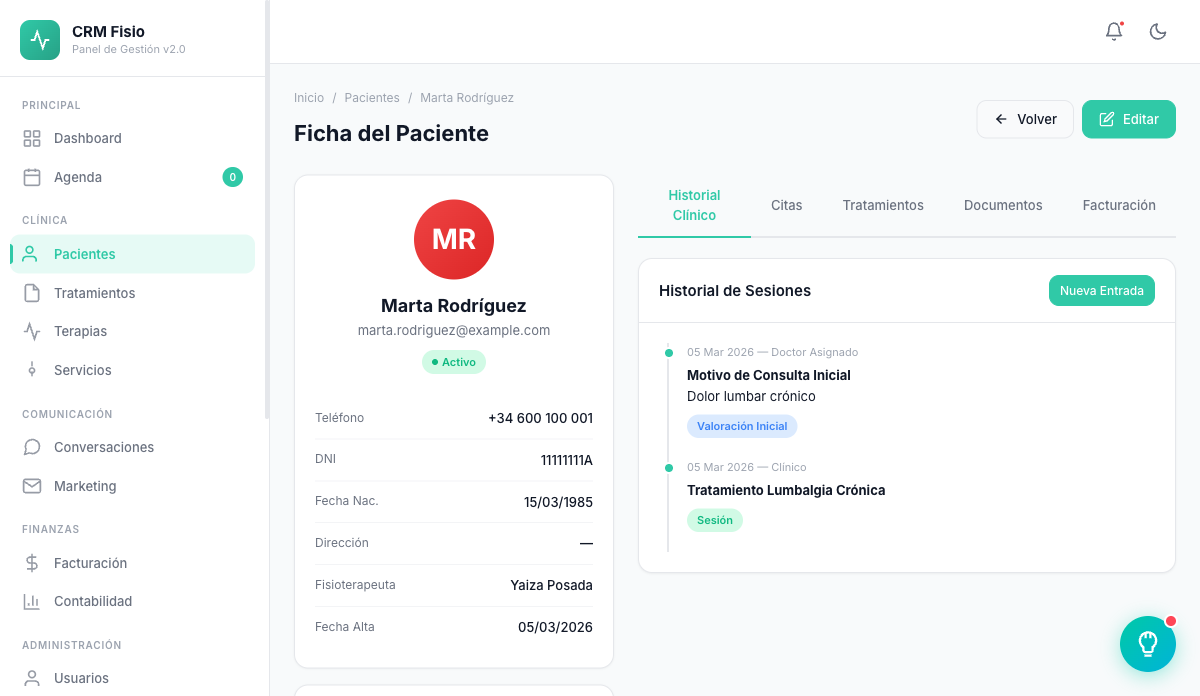
Every patient's full history in a single record
Personal data, medical history, treatments, appointments and signed consent forms all in one place. Open the record and you know how the patient arrives at the session.
- History organized on a timeline
- Consent forms signed on tablet or phone
- Encrypted clinical data with permission-based access
What gets complicated with patients today
Information scattered everywhere
The intake notes on paper, appointments in another calendar and consent forms in a folder. Preparing a session means opening three different places.
Signatures hard to find
Consent forms printed, signed by hand and filed wherever there's room. Knowing which version each patient signed takes time.
Everyone sees everything
Without permissions, anyone on the team can open any record. And clinical data is the most sensitive information you keep.
What the patient record keeps
What a physiotherapist checks before, during and after every session, without leaving the record.
Complete clinical record
Personal data, reason for consultation, medical history, allergies and current medication, alongside the assigned physio and the patient's status.
History on a timeline
Appointments, treatments and clinical notes ordered by date, with who saw the patient and how each appointment ended.
Treatments with follow-up
Diagnosis, goals, planned sessions and initial and current pain level. Every completed appointment adds a session to the plan.
Voice dictation
Dictate the treatment plan or the session record and Fisionexa fills in the form fields.
Consent forms with digital signature
Generate the consent form from your templates and the patient signs on a tablet or their phone. The PDF is saved straight into their record.
Role-based access
Each physio sees their own patients. Viewing the whole clinic's patients, editing, deleting or exporting are permissions you assign by role.
How it works day to day
-
You register the patient
Fill in their details and medical history at the first visit. If they're a minor, link them to their guardian.
-
They sign the consent form
Generate the link from the record and the patient signs on the clinic's tablet or on their own phone.
-
You track their progress
When each appointment is closed, the session is added to their treatment and the appointment is recorded as completed in their history.
Encrypted clinical history and signatures you can prove
Medical history, allergies, medication, diagnosis and clinical notes are stored encrypted. Every consent form keeps the exact text that was signed, the template version, the date and the IP address, so you know exactly what each patient agreed to.
- Clinical fields encrypted in the database
- Text, version, date and IP address for every signature
- Signature link that expires after two hours
- Guardian signature when the patient is a minor
What people usually ask
Does each physio only see their own patients?
It depends on the role. With the basic permission, each physio sees and edits the patients assigned to them. Whoever has the "view all" permission accesses the whole clinic's patients.
How does the patient sign the consent form?
You generate it from their record using your templates. You get a link you can open on a tablet or copy and send. Once signed, the PDF is saved to their record.
What about patients who are minors?
You link them to their guardian in their record. When generating a consent form for a minor, Fisionexa asks you to choose the guardian who signs it.
Can I search for and export my patients?
Yes. The search finds anyone by first name, last name, phone, email or ID document. Whoever has export permission can download a CSV of the patients they can see.
Keep exploring the system
Every module shares data with the rest: what happens in one reaches the others without copying anything.
See it working with your clinic
Request a free 20-minute demo or jump straight into the interactive demo: the website and dashboard of a sample clinic.